Quick poll! How many of you have ever bought a bookshelf or table from an online retailer, and then had to assemble it once the giant box finally arrived? Yes? Follow-up question, did said bookshelf or table come with cheap alan wrenches or screwdrivers that couldn’t properly tighten a bolt if your life depended on it? Yes? Then you can appreciate the value in what having the right tool for the job can do for a person. Once in a while, the pack-ins will be of tolerable quality. But for me, I’d rather just pull out my own set and do the job with tools I know actually work.
Much like furniture assembly, there is a plethora of tools available to writers. These tools each have their own specialties, and like those cheap alan wrenches and screwdrivers, some tools are better than others.
I wanted to cover writing tools early, because I wanted to discuss the tools that I currently use, and mention a few that I don’t. Then someday in the distant future, maybe I’ll revisit this topic and see how much my tool-set has evolved over time. Also, I’d love to hear about any of the tools that you use when writing, or even just planning out writing projects.
Microsoft Word
Probably the most common tool that a writer uses is a word processor. After all, how else are you going to pen the next Nebula winner? You could use a notebook and pencil to write out your story. Or if you really wanted to go old-school, grab a typewriter and go to town that way! In our modern age of technology, those options are more than a little antiquated. Nowadays, many places ask for digital submissions with particular formatting guidelines. The most efficient way to meet these guidelines is with the use of a word processor, where a couple of clicks will give you exactly what they need.
Word processors come in all shapes and sizes. The most recognizable one being: Microsoft Word. I’ve been using Microsoft Word for years to note out my stories, to copy down research from various websites, and to draft out chapters. It’s been my go-to piece of software for years. I can’t count how many pages worth of documents I’ve built up in Word alone!
That said, Microsoft Word isn’t the only option. Libre Office is a free alternative to the Microsoft office suite. It includes its own versions of Word, Excel, and other office programs. While there is some compatibility between Microsoft Word and Libre Office’s equivalent, it’s not perfect and I wouldn’t recommend going back and forth between the two. That said, Libre Office is a viable option for those looking for a cheaper(free) alternative to Microsoft Office.
While we’re on the subject of word processors, when I’ve needed a quick editor for tossing down some notes, I’ve used NotePad++. Now, you may ask: what is NotePad++? It’s a free alternative to the built in NotePad program on Windows machines. NotePad++ is more geared towards software developers, as it provides helpful features for dealing with HTML, JSON, and XML (things that I would imagine writers have zero interest in). That said, NotePad++ is quite customizable and I have mine setup with a dark mode on it. For quick notes, it’s a handy little program when one doesn’t require all the bulk of a full-on word processor.
Microsoft Excel

Keeping in the vein of Microsoft Office tools, Microsoft Excel is one of my most valuable tools (or really any spreadsheet software could be inserted here). What could I possibly use Excel for? It’s my accountability application. I use a custom Excel spreadsheet to track the number of words that I write in a day. I break it down by month, and by year to help me track my progress. As you can see in the included image, there’s far more zeroes on this spreadsheet than I care to admit to.
With that said, this spreadsheet helps keep me on task. With having used this method of accountability for as long as I have, it’s drilled into my head the importance of keeping up with my writing. For as many zeroes as appears in this spreadsheet, I never enjoy entering them. Instead, I get a nice boost of confidence whenever I can enter a word count that surpasses my daily goal of 500 words. On top of that, when a monthly total surpasses multiple previous months, that only adds fuel to my writing fire.
One thing I’ve read from various articles is that being held accountable makes a difference. If you have someone to report your progress to, you’re far more likely to work on your craft so that when you do meet with that person, you can show them said progress. I experienced this first-hand as a software developer when I worked with a friend overseas to develop a simple mobile video game. I’d always wanted to create a video game, but never got up the motivation to do it. When she started working with me though, I knew that if I didn’t make progress on our game, she would be upset. That alone motivated me to do my part, and after months of working together, we managed to push the game out onto the Google Play Store.
With my writing, I don’t have such a person to hold me accountable. I have this Excel spreadsheet instead. While my failures are on full display, so are my successes. And because of what this spreadsheet has drilled into me, I’m currently within four chapters of having completed a full draft of what will hopefully be my first novel.
SmartEdit Writer
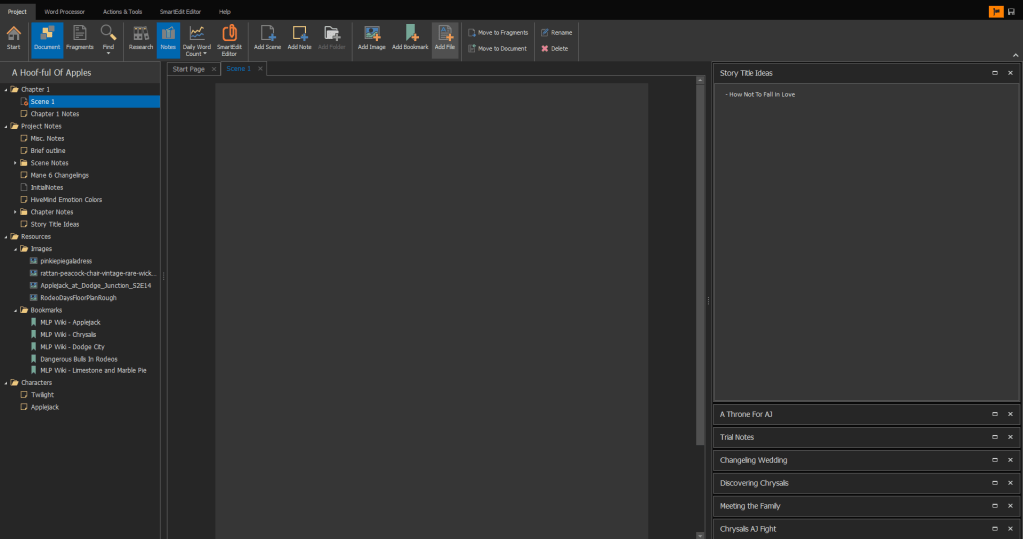
Remember when I said I used Microsoft Word for a great deal of my writing? Well I wasn’t being completely honest when I said that. While it is very true that I’ve used Microsoft Word for my writing in the past (holding hundreds of thousands of words worth of writing no doubt), I’ve since drifted away from the software and to something far more writer-oriented. I learned about SmartEdit Writer from a local author whom I’d had the pleasure of meeting a couple years back. He’d told me of the free software, and how it was more tailored to a writer’s needs. He encouraged me to try it out. Being stubborn in my ways, it took me a long time to break away from my Microsoft Word habits and move fully into SmartEdit Writer.
SmartEdit Writer is so much more than a word processor. It allows you to organize your novel/memoir/short story/etc. into a project. You can add things such as: notes, bookmarks, images; and then organize them into folders. It also allows you to break your story down by scenes, and then also provides a tool for exporting your work (a feature I haven’t tried as of yet). While I haven’t exhaustively tested out all of the program’s features, what I have worked with, I’ve been quite pleased with. With Word, I’d have two or sometimes three separate documents open, and I’d have to flip between them to work on my writing. With SmartEdit Writer, everything is quickly accessible in one place. If you’ve used the Microsoft suite before, then SmartEdit Writer will feel very familiar as it has a very “office-y” vibe to it.
If you’re looking for something different to try with your writing, I’d recommend giving SmartEdit Writer a go.
iTunes/Music
This next one may seem a bit confusing. Why would iTunes be listed as a writer’s tool? It’s just a piece of software for playing and organizing music! Exactly! This plays more to my style of writing, so it may not be for everyone. When I work on a story, I like to find a song that matches the tone of my story, and could even be considered the “theme song” for my story. Then, when working on notes or chapters for said story, I like to listen to the song on repeat to help with inspiration (or even a mood setter) for whatever I’m working on.
With the novel I’m working on now, my song of choice is a song by James Durbin: Everything Burns. Now, take a guess as to how many plays this song has on my iTunes so far? I’ll wait. Beep! Time’s up! If you guessed 2,008 plays, you’re correct! And by the way, that number is only going to go up. The story isn’t done yet!
I wasn’t kidding when I said I listened to the song on repeat while writing. Of course, I realize that this may not be a tool for everyone. If music isn’t your thing, maybe there’s something else that gets those words flying onto the page. It’s all about putting yourself in the right frame of mind. For me, music is what helps me get into that “happy place.” (Happy Gilmore anyone?)
Perhaps in a future blog post, I’ll dig a bit deeper into inspiration and what inspiration looks like for me. For now though, lets move onto something we’re all a bit familiar with.
WordPress
WordPress! This is the newest tool in my toolbox that I’m still trying to learn. While I’ve had an account with WordPress for quite some time, I never actually did anything with it. I decided to start writing on WordPress to: help further my reach with people, engage with a community of writers/readers, and learn more about myself as a writer.
Writing can be an isolating hobby/career. One person in front of a computer, typing away until their fingers wear down to bone. Okay, so that’s a bit of an exaggeration, but it still hits the nail on the head. When I’m writing, be it fan fiction, fiction, or blog posts like this one, I’m not talking to anyone or working in a group. I’m just sitting in front of my computer and typing away. Don’t get me wrong, I love to write and I’m not much of a social butterfly anyways. I’m actually quite the opposite. But it is important to belong to a community for both encouragement and critique.
As cliched as it sounds, working together and helping each other lets everyone grow as writers and as individuals. By helping to further my reach, I’m hoping to meet like-minded people, and even some not so like-minded people. I’m hoping to become part of a writing community and decided that WordPress would be a great place to start. And who knows where I’ll be a year from now? But I have to admit, I’m looking forward to finding out!
Thesaurus/Dictionary
Now let’s hit up some of the more basic tools in not just my toolbox, but everyone’s toolbox. And how more basic can we get than to bring up dictionaries and thesauruses? I won’t spend much time on these tools as we’re all familiar with them, and I’m sure we’ve all used them at one point or another.
My main experience with dictionaries, with regards to writing (mainly using Google for looking up words versus the hard covered Webster dictionary at this point), is when while writing, I use a word I don’t quite know the definition of. So why’d I use the word in the first place? Simple! I used it because it felt like the right thing to do. The dictionary lookup is more of a confirmation. Nine times out of ten, my instinct ends up being correct.
The more useful tool though, is the thesaurus. Again, I mainly use an online thesaurus. My main use case with pulling out the thesaurus from my toolbox, is when I’m searching for a particular word to articulate what I want to convey to the reader. Usually it’s a word that I know, but somehow escapes me. Other times, I’m not satisfied with how I phrased a particular description and so I go searching for something better. In the past, I’ve used dedicated thesaurus software, but now, an online search is more than enough for me.
Baby Name Websites (BabyNames.com)
As a computer programmer, one of the phrases I constantly hear at work is: “naming is hard.” And it is! It’s extraordinarily difficult to name properties and variables in code that accurately reflect what they are for. Sometimes, it’s easy. If I have a program that adds two numbers together, the answer can be called the “sum.” But, if a couple hundred lines of code returns a value, how does one describe the value being stored? That’s when naming gets difficult.
Similar to programming, I’ve found that naming characters, cities, and fictional companies (and whatever else you can think of) can be just as difficult. How does one approach such a daunting task? Should actual company and city names be parodied or should something completely original be brought into existence? Honestly, I don’t have a good answer for that question (and I think it depends on the piece). For naming characters, I have at least settled upon an approach that has worked out for me so far.
Baby name websites! There are a plethora of websites dedicated to baby names. The intended use of said sites are to provide a resource for parents who are expecting a child. The sites tend to break names down by gender, and then sorts them alphabetically. One can also search names by country of origin, or even meaning. It’s these last two filters that I use most often. I’ll use country of origin as a way to provide a certain level of consistency with the names, or to help with naming a foreign or more exotic character. As for the name’s meaning, I like to use names where the meaning of the name reflects a certain trait of the character.
Even with the baby name sites, naming is a difficult task. With some stories, sometimes I know the names that I want right away. With others, I need a bit more soul searching, and that’s where these websites come into play. As for company names and city names (and whatever else you can think of), I’ve read that one should list out 15-20 possible names for their entity in question. And only after the eighth or ninth name does actual contenders for the throne start to appear. Is it perfect? No. Is it for everyone? Certainly not! But it is another strategy I have used and found helpful when brainstorming names.
KanBan Boards (KanBanFlow)
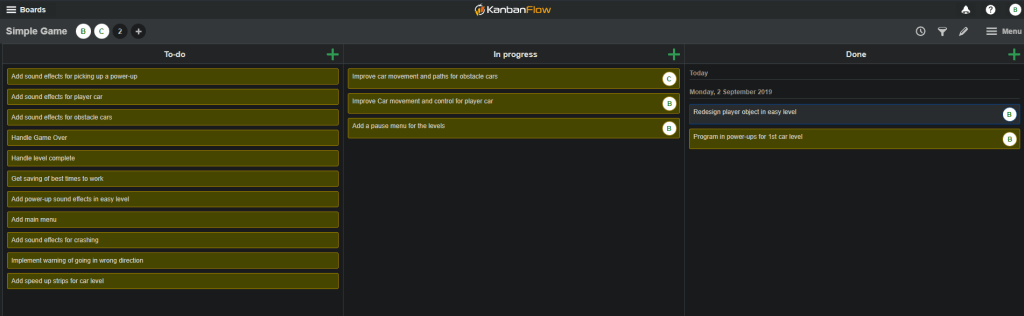
Now we’re moving away from tools that I actually use, and into a couple of “potential tools” that I either use for other types of projects, or don’t particularly use at all. The first of these two tools are: kanban boards! For those of you unfamiliar with kanban boards, they are a way for an individual or a group of people to organize and track the progress of tasks in a project.
Going back to my programming roots, I’ve included an image of a kanban board for a video game I was developing with a friend. This particular game was scrapped for another idea, but the remnants of the game’s progress remain. As you can see, our kanban board is divided into three columns: To-do, In Progress, and Done. When I would finish a task, I would move the card from the “In Progress” column to the “Done” column. I would then grab another task, assign it to myself, and move it to “In Progress.” Rinse and repeat.
While I don’t use kanban boards for writing projects (yet), I see the potential for them to be useful. One could breakdown the scenes they need to write for their story, and then use the kanban board to decide which scene to grab and work on next. The kanban board could even be used to help plot out the entire process for a writing project (from brainstorming to publishing). Or, it could be used to keep track of multiple writing projects so that a writer can track which projects are awaiting feedback from an editor, and which projects they currently need to be working on.
The specific website that you see in the picture is from kanbanflow.com. What you see in my image is the free version. With the free version, you’re able to have multiple boards, you can specify how many columns you want, and what the columns are (you don’t need to have the To-do, In Progress, and Done columns that I do). You are able to add people to work with you as see in my image. With the individual tickets, you’re also able to change the color of the card and provide labels as to what the different colors represent.
It’s certainly not a tool that everyone will find useful. However, after having used kanban boards for several years with programming, I’m tempted to try using them with my writing. Because of that, I wanted to share kanban boards with all of you!
Social Media (WordPress excluded)
Finally, the last tool to mention is one which I’m sure that everyone is familiar with, and that is social media! Now one could argue that WordPress is a form of social media, and I certainly wouldn’t disagree with that. What I am talking about though is more of the Twitters and Facebooks and Instagrams of the social media sphere. Places where users can quickly interact with each other in short bursts, and maybe reach hundreds or thousands of people (if they’re lucky).
I grew up without the internet for much of my life. In fact, I didn’t have consistent internet access until I attended college. As a result, I missed the whole social media train. Twitter, Facebook, and all the others, I never put together any meaningful accounts with any of them. I have a Twitter account where I follow a couple of people, but I can count on one hand the number of times I’ve actually posted anything. Not to mention, the number of times I actually visit the account in a year I can also count on one hand (maybe two).
I do generally find myself better off not being on social media as there is a lot of unscrupulous characters on there. Every so often I’ll see a commentator on Youtube or the news discussing what Twitter is crying over or raging over on any given day. Fun! All that aside, there is great value for writers to be on social media.It provides easier access to their readers and other writers (probably editors and publishers as well). It gives writers a venue for promoting their newest works, and possibly helping get their foot in the door to things like writers’ groups.
Social media may be the type of tool I shy away from (apart from WordPress if you count it as such), at least for now. And it’s not so much of the darker side of social media, but more-so that I wouldn’t know what to do with it. If I created an account on a social media platform, I’d more than likely sink into oblivion with inactivity. Perhaps this is a tool for my future self to consider using, but for my present self, I think I’m good.
Closing the Toolbox
There are countless tools out there for writers to take advantage of. Many of the items I discussed here are available for free, or at least have free versions. The trick with picking tools worthy of one’s toolbox, is sifting past the trash to find the treasure. I’m not saying that the tools I’ve listed are perfect, or are even appropriate for everyone. As of right now, they’re exactly what I need to get my work done.
In time, when I look back upon this post, my tool-set may evolve to the point where this list changes completely. Or, there may be only tweaks. Whatever the case is, I hope I’ve provided some useful resources for you to use with your own writing. I’d be curious to hear of any tools that you use that are not on this list. Or do you already use some of them? And if you don’t, will you start experimenting? I’m curious to find out!
 Brian The Wanderer
Lovely post. I myself use Google Docs or Scrivener for novel writing, because of the unique features each platform has. I like where you’re going with this blog. Keep on keeping on, Brian!
LikeLike
Thank you so much for the comment! I’ve heard of Scrivener, but haven’t used it myself. Maybe I should take another look sometime. With you mentioning Google Docs, it reminded of another tool I forgot to include. I use OneDrive to help keep my documents and projects backed up. I don’t really need to interact with it, so that’s how that tool slipped through the cracks.
I’m glad you enjoyed this post. I’ll certainly do my best to keep this blog going, and see where it leads! Thank you again!
LikeLike